Sysinfo System Report.
User, machine, public and local IP, listening ports, known SSH hosts and running containers.
Five commands in one
A single Python file. It runs on any machine with python3 and replaces the
five commands below.
| Need | Usual command | sysinfo |
|---|---|---|
| User, machine, OS | whoami · hostname · uname -a | -a |
| Public and local IP | curl ifconfig.me · ip addr | -l --local-ip |
| Listening ports | ss -tulpn | --ports |
| Known SSH hosts | cat ~/.ssh/config | --ssh |
| Containers and networks | docker ps · docker network ls | --docker |
sysinfo.py file, to copy wherever needed.-t), plus an interactive mode with tabs (-i).--update checks the SHA256 and replaces the binary atomically.Two ways
01 — curl | bash
Checks python3 and curl, verifies the shebang and the SHA256, installs
in ~/.local/bin/sysinfo, and prints the $PATH line to add if needed.
02 — Manual
mkdir -p ~/.local/bin
cp sysinfo.py ~/.local/bin/sysinfo
chmod +x ~/.local/bin/sysinfo
export PATH="$HOME/.local/bin:$PATH" # si pas déjà dans le PATHcurl -sSL https://devexploris.com/sysinfo/sysinfo.py -o sysinfo.py
curl -sSL https://devexploris.com/sysinfo/sysinfo.py.sha256 -o sysinfo.py.sha256
sha256sum -c sysinfo.py.sha256 # shasum -a 256 sur macOSAvailable flags
Flags compose: each one adds its block to the output. -a turns them all on.
01 — System
| Flag | Output |
|---|---|
| -a, --all | Every block available |
| -4, --ipv4 | IPv4 address of the outbound network interface |
| -g, --groups | Groups the current user belongs to |
| -u, --uptime | Machine uptime, read from /proc/uptime. Linux only |
02 — Network
| Flag | Output |
|---|---|
| -l, --location | Public IP + city/country via ipinfo.io, fallback ip-api.com |
| --local-ip | LAN address, without external call |
| --vpn | VPN / proxy / hosting detection (heuristic, see limitations) |
| --ports | Listening ports via ss, falling back to netstat |
03 — SSH · Docker
| Flag | Output |
|---|---|
| --ssh | Hosts declared in ~/.ssh/config, with user and hostname |
| --docker | Running containers and Docker networks, via the docker CLI |
sysinfo -l --vpn          # localisation + détection VPN
sysinfo --local-ip -4     # IP locale et IPv4 réseau
sysinfo -a -t             # tout, sous forme de tableau
sysinfo --ssh --docker # hosts SSH et containersIn lines, or in a table
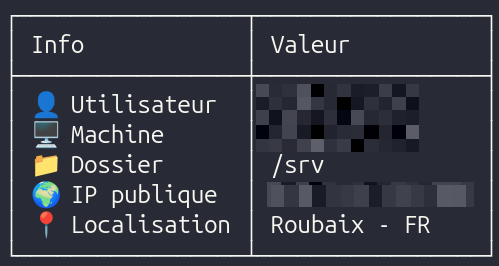
By default, one line per info. -t renders the same data as a two-column table,
fitted to the terminal width. -c adds color, -i opens the interactive mode.
| (default) | One line per info |
| -t, --table | Two-column table |
| -c, --color | ANSI colors |
| -i, --interactive | Navigable tabs, see below |
| -h, --help | Flags and examples |
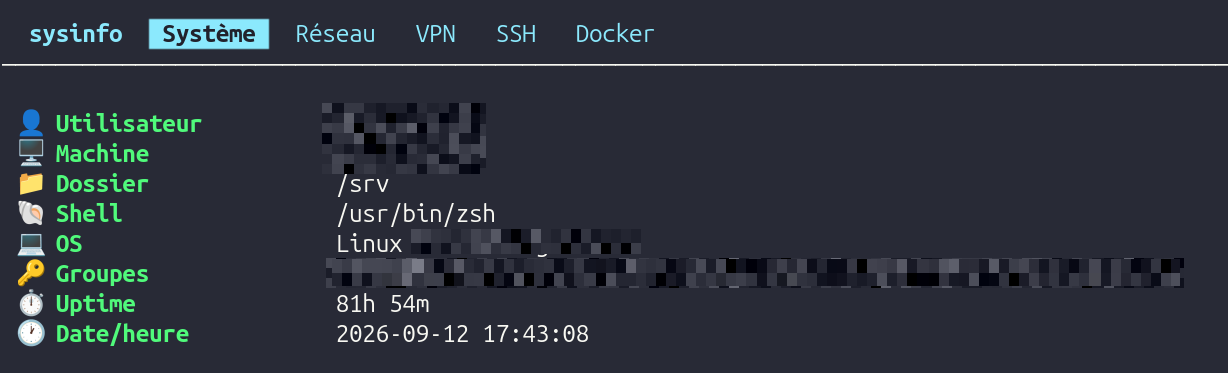
Five navigable tabs
Built with curses. Each tab caches its result in memory;
r forces a fresh fetch.
Keyboard
| Key | Action |
|---|---|
| ← → · Tab | Switch tab |
| r | Refresh the current tab (invalidates its cache) |
| q · Échap | Quit |
Checksum and permissions
The script is published with its SHA256: install.sh and --update check
it, and it can be checked by hand. The script does not call sudo.
sha256sum -c sysinfo.py.sha256 # shasum -a 256 sur macOSPermissions
| Feature | Without sudo | With sudo |
|---|---|---|
| System · network · SSH | Full output | No difference |
| --ports | Other users' processes shown as N/A | All processes visible |
| --docker | Error message if not in the docker group | Works |
| --update | Suggests sudo if installed in a system directory | Works |
What --update does
✓ Checksum vérifié
✓ sysinfo mis à jour
| 01 | The remote script is downloaded to a temporary file. |
| 02 | Its SHA256 is verified against the published checksum. If they differ, nothing is written. |
| 03 | The remote checksum is compared to the installed file's. If they match, the script is already up to date. |
| 04 | os.replace() swaps the file atomically: an interrupted update leaves no half-written script. |
shutil.which() when the script is launched through the
$PATH, so --update works from any install directory.
External API and uptime
| --vpn | Relies on an external API call: a rate limit can be reached. |
| -u, --uptime | Linux only. |